Install SharePoint Server 2016 Preview:
- Double click on SharePoint 2016 Preview installer,
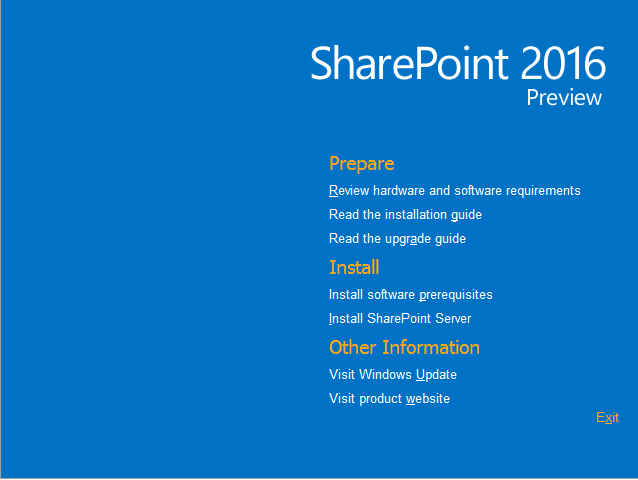
- Click Install software prerequisites to install all prerequisites component online.

- Accept Licence Agreement and Next to show the progress of installation

- Restart your server
 After restart may be face the following error “Microsoft .NET Framework to disable RC4 in Transport Layer Security, you need to install the security update for .net framework”, So you can download the security patch from Microsoft Download Center through this URLhttp://www.microsoft.com/en-us/download/details.aspx?id=42883
- Run the Prerequisites again so you can see the problem is resolved an the installation completed.

- Now from the first window select Install SharePoint Server,When prompted, use the following product key: NQTMW-K63MQ-39G6H-B2CH9-FRDWJ

- Again accept licence agreement.

- Choose the file location for SharePoint server and search server files. Search index files need sufficient free space.then click install now.

- After install run configuration wizard and click close.

- Click Next

- Select Create a new server farm

- Enter the database server and database access account with (Dbcreator,SecurityAdmin,SysAdmin).then press Next.

In some cases you can face problem in connecting to SQL Server so make sure TCP/IP is enabled in SQL Server Configuration Manager. If you still getting the error then turn off the firewall on SQL server machine.
- Type the pass phrase,click Next

- Now you will see new screen than not found in the previous SharePoint version it’s Minrole.
- MinRole provides an out-of-the-box experience that provides topology recommendations, simplifies on-premises server farm deployments, and reduces the unit of scale to simplify capacity planning while providing predictable performance characteristics through enabling selective provisioning of SharePoint server roles based on position and function within a topology.
- MinRole enables an administrator to select the appropriate server role for a specific server when provisioning SharePoint Server 2016 based on five (5) predefined configurations:
Role Name Description Special Load Reserved for services to be isolated from other services, I.e. 3rd party, PerformancePoint, etc. Web Front End Services end user requests, optimized for low latency. Single Server Farm Provisions all services on the server for a single server deployment. This role is provided for evaluation and development purposes. Search Reserved for Search services. Application Services the backend jobs or the requests triggered by backend jobs, optimized for high throughput. Distributed Cache Services distributed cache for the farm. Optionally, the server assigned to this role can load balance end user requests among the web front ends. A predefined server role is configured and optimized for its intended purpose provisioning the expected services designed to support its function within a server farm environment. - In this post we will use single-server farm installation so will go with the last option.Click Next.

- Specify port for Central Admin or can use the default,Click Next.

- Review the settings and Click Next.


Enjoy

No comments:
Post a Comment